If you’ve decided to learn Java in 2026, you’re making a smart choice. Despite the rise of new programming languages and AI-powered tools, Java continues to be one of the most widely used programming languages in the world. Thousands of companies still rely on Java to build enterprise applications, banking systems, web platforms, Android applications, and large-scale software products.
The problem many beginners face isn’t finding Java tutorials. It’s knowing what to learn and in what order. One video teaches loops. Another jumps into Spring Boot. A blog recommends Data Structures before OOP. After a few days, most beginners feel completely lost. That’s why having a clear learning path matters. This Java Roadmap 2026 will help you understand exactly what to learn, step by step, from absolute beginner to job-ready Java developer.
Why Learn Java in 2026?
Some people think Java is outdated. That’s far from the truth. Java continues to power millions of applications worldwide.
Industries Using Java
- Banking
- Finance
- Healthcare
- E-commerce
- Enterprise Software
- Government Systems
- Cloud Applications
Large companies continue investing heavily in Java because it is reliable, secure, and scalable.
Career Opportunities
Learning Java can lead to roles such as:
- Java Developer
- Backend Developer
- Full Stack Developer
- Software Engineer
- Android Developer
- Cloud Developer
The demand remains strong, making Java an excellent skill for beginners.
Understand How Programming Works First
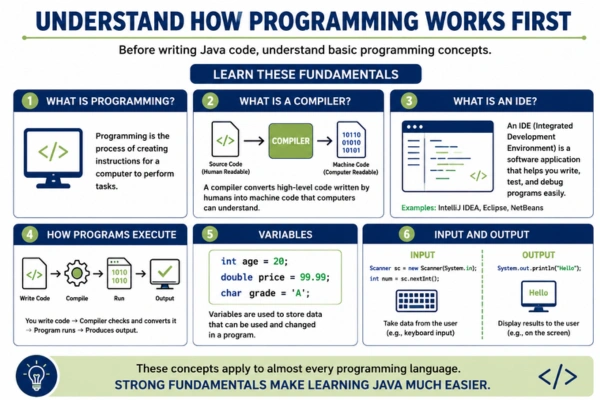
Before writing Java code, understand basic programming concepts.
Learn These Fundamentals
- What is Programming?
- What is a Compiler?
- What is an IDE?
- How Programs Execute
- Variables
- Input and Output
These concepts apply to almost every programming language. Strong fundamentals make learning Java much easier.
Step 1: Set Up Your Java Development Environment
Before writing code, install the necessary tools.
Install Java Development Kit (JDK)
The JDK contains everything needed to develop Java applications.
Choose an IDE
Popular options include:
- IntelliJ IDEA
- Eclipse
- NetBeans
- VS Code
Many beginners prefer IntelliJ IDEA because of its user-friendly interface.
Verify Installation
Run a simple Java program to ensure everything works correctly.
Getting your environment ready is the first practical step in the Java Roadmap 2026.
Step 2: Learn Java Basics
This is where your coding journey begins.
Variables and Data Types
Learn:
- int
- double
- float
- char
- boolean
- String
These are the building blocks of every Java application.
Operators
Understand:
- Arithmetic Operators
- Comparison Operators
- Logical Operators
- Assignment Operators
Input and Output
Practice:
- Printing output
- Taking user input
These concepts are simple but essential.
Step 3: Master Control Statements
Programs need decision-making abilities. That’s where control statements come in.
Conditional Statements
Learn:
- if
- if-else
- else-if
- switch
Loops
Learn:
- for loop
- while loop
- do-while loop
Practice Examples
Build:
- Number Guessing Game
- Calculator
- Multiplication Table Generator
Practice helps reinforce concepts quickly.
Step 4: Learn Arrays and Strings
Arrays and Strings are used constantly in real-world applications.
Arrays
Learn:
- Creating Arrays
- Accessing Elements
- Iteration
- Multi-Dimensional Arrays
Strings
Understand:
- String Methods
- Concatenation
- Comparison
- Manipulation
Many coding interview questions involve arrays and strings.
Spend extra time here.
Step 5: Learn Object-Oriented Programming (OOP)
OOP is one of the most important topics in Java. Many beginners struggle with it initially.
That’s normal.
Classes and Objects
Understand how objects represent real-world entities.
Encapsulation
Learn how to protect data using access modifiers.
Inheritance
Understand code reuse through inheritance.
Polymorphism
Learn how one interface can support multiple implementations.
Abstraction
Focus on hiding unnecessary details.
Mastering OOP is a major milestone in the Java Roadmap 2026.
Step 6: Learn Exception Handling
Programs don’t always run perfectly. Errors happen. Java provides mechanisms to handle them.
Topics to Learn
- try
- catch
- finally
- throw
- throws
Why It Matters
Exception handling makes applications more stable and reliable.
Professional developers use it constantly.
Step 7: Learn Collections Framework
The Collections Framework is heavily used in Java development.
Important Collections
- ArrayList
- LinkedList
- HashSet
- TreeSet
- HashMap
- TreeMap
Why Learn Collections?
Collections help manage and organize data efficiently. Almost every Java project uses them.
Step 8: Learn File Handling
Applications often need to read and write files.
Concepts to Learn
- Reading Files
- Writing Files
- BufferedReader
- FileWriter
- FileInputStream
- FileOutputStream
Practice Project
Build:
- Student Record System
- Notes Manager
- Expense Tracker
File handling introduces real-world programming scenarios.
Step 9: Learn Java 8 Features
Modern Java development heavily relies on Java 8 and later versions.
Lambda Expressions
Simplify code writing.
Streams API
Process collections efficiently.
Functional Interfaces
Improve flexibility and readability.
Method References
Write cleaner code. Most modern Java interviews include questions about these features.
Step 10: Learn Multithreading
Many applications perform multiple tasks simultaneously.
Multithreading makes this possible.
Topics to Learn
- Threads
- Runnable Interface
- Thread Lifecycle
- Synchronization
- Executors
Why It Matters
Understanding concurrency helps build scalable applications.
Step 11: Learn JDBC
JDBC connects Java applications with databases.
Concepts to Learn
- Database Connections
- CRUD Operations
- SQL Integration
- Prepared Statements
Databases to Practice
- MySQL
- PostgreSQL
Database integration is a critical skill for backend developers.
Step 12: Learn Data Structures and Algorithms
Many companies test these concepts during interviews.
Data Structures
Learn:
- Arrays
- Linked Lists
- Stacks
- Queues
- Trees
- Graphs
Algorithms
Understand:
- Searching
- Sorting
- Recursion
- Dynamic Programming
Strong DSA knowledge improves problem-solving ability.
Step 13: Learn Git and GitHub
Version control is essential for modern software development.
Git Concepts
- Clone
- Commit
- Push
- Pull
- Branching
GitHub Benefits
- Portfolio Building
- Project Collaboration
- Code Sharing
Recruiters often review GitHub profiles.
Step 14: Learn Spring Framework
Spring is the most popular Java framework.
Why Learn Spring?
Many Java backend jobs require it.
Topics to Learn
- Spring Core
- Dependency Injection
- Spring MVC
- Spring Data JPA
Spring simplifies enterprise application development.
Step 15: Learn Spring Boot
Spring Boot has become the industry standard for Java backend development.
Topics to Learn
- REST APIs
- Controllers
- Services
- Repositories
- Configuration Management
Practice Projects
Build:
- Employee Management System
- Student Portal
- Task Manager API
Most Java backend developers use Spring Boot daily.
Step 16: Learn REST APIs
APIs allow applications to communicate.
Topics to Learn
- GET Requests
- POST Requests
- PUT Requests
- DELETE Requests
- JSON
- HTTP Status Codes
API development is one of the most valuable skills in the Java Roadmap 2026.
Step 17: Learn Basic Cloud and Deployment
Applications must eventually be deployed.
Concepts to Learn
- Hosting
- Cloud Basics
- Docker
- AWS Fundamentals
Deployment Platforms
- AWS
- Render
- Railway
Deployment knowledge makes you more job-ready.
Step 18: Build Java Projects
Projects demonstrate practical skills.
Beginner Projects
- Calculator
- Student Management System
- Library Management System
Intermediate Projects
- Expense Tracker
- Inventory Management System
- Banking Application
Advanced Projects
- E-Commerce Backend
- Learning Management System
- Employee Management Platform
Projects strengthen both skills and resumes.
Common Mistakes Beginners Make
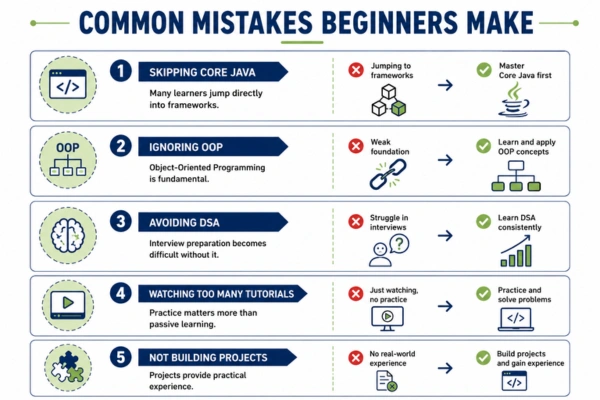
Skipping Core Java
Many learners jump directly into frameworks.
Master Core Java first.
Ignoring OOP
Object-Oriented Programming is fundamental.
Avoiding DSA
Interview preparation becomes difficult without it.
Watching Too Many Tutorials
Practice matters more than passive learning.
Not Building Projects
Projects provide practical experience.
Recommended 6-Month Java Learning Plan
Month 1
- Java Basics
- Variables
- Loops
- Conditions
Month 2
- Arrays
- Strings
- OOP
Month 3
- Collections
- Exception Handling
- File Handling
Month 4
- JDBC
- SQL
- Java 8 Features
Month 5
- Spring Framework
- Spring Boot
Month 6
- REST APIs
- Projects
- Deployment
- Interview Preparation
Following a structured plan helps maintain focus.
Frequently Asked Questions (FAQs)
Is Java worth learning in 2026?
Yes. Java remains one of the most widely used programming languages worldwide.
How long does it take to learn Java?
Basic Java can be learned in a few months. Becoming job-ready typically takes 6–12 months of consistent practice.
Is Java difficult for beginners?
Java has a learning curve, but it is beginner-friendly when learned step by step.
Should I learn Java or Python?
Both are valuable. Java is often preferred for enterprise applications and backend development.
Do Java developers need SQL?
Yes. Most backend applications interact with databases.
Can I get a job after learning Java?
Yes. Combined with projects, DSA, SQL, and Spring Boot, Java skills can lead to excellent career opportunities.
Final Thoughts
Learning Java may seem like a long journey when you first look at everything involved. But don’t let that intimidate you. Thousands of developers started exactly where you are today. The key is to follow a structured Java Roadmap 2026, focus on one topic at a time, and build projects consistently. Start with the basics. Master Object-Oriented Programming. Learn databases. Explore Spring Boot. Build practical applications. Most importantly, keep coding. Reading tutorials helps. Watching videos helps. But writing code is what truly turns a beginner into a developer. Six months from now, you’ll be surprised by how much progress you can make if you start today.